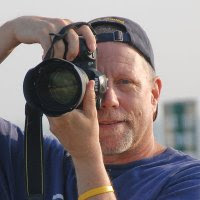
The Great Tennessee Air Show was this past week-end at Smyrna Regional Airport (south of Nashville). I wasn't able to attend on Saturday, but went Sunday. My preparation for this event included renting a Canon EF 300mm f4 IS lens from www.lensrentals.com (more about this great service in a future blog). I wanted to see if shooting with a prime telephoto would produce more photos within my acceptance level than my previous air show experience with a telephoto zoom. Also, knowing the f4 was significantly less weight than a f2.8 lens was another appealing factor. The weather Saturday was partly cloudy with some good wind, but overall warm enough to be comfortable outside. I'd taken our foreign exchange student to the Nashville airport to catch her flight to New York and then went to observation area on off Vultee Blvd to practice with the 300mm lens. The lens performed satisfactorily, and I also included using a 1.4 teleconverter. I'd planned on using this combination (300mm with 1.4 teleconverter) at the air show on Sunday.
A serious cold front moved thru Tennessee on Saturday night and it was in the low 40's when I left for the air show at about 8:30p. The late news weather has forecasted this downturn in temperatures so I was prepared. The newspaper had reported 40,000 spectators at the show on Saturday, but I wasn't sure how many would show up on Sunday due to the cold and forecasted rain. We got to the air show at about 9:30a and staked out our spot to the left of center and I photographed some of the static displays waiting for the flying to start. The flying started right on time at 11:30a and though it was a cold wind, it never rained to any significant degree during the day. The complete overcast meant the light was flat and I didn't have to worry about light & shadow sides of the planes during their maneuvers. However, the sky was so flat and gray that lot of my images looked like they were shot in front of an off-white curtain. Later in the day I did find myself tracking the planes and trying to get most of my shots with them in front of the darker clouds. The wind did help clear out the smoke that the planes put out during their show. The crowd did thin out during the mid-afternoon and everyone left in a hurry as soon as the Blue Angels landed at the end of their show.
Overall, it was a fun day of photography and I enjoyed spending time with my son, James. He's really into airplanes and seems to enjoy himself so much at these types of events. I shot about 2400 images and after the first look am hoping for 30-40 "good" ones to make a web album. Don't think I got anything that is super dramatic, but who knows. I'm usually overly critical of my photos upon first viewing them. Sometimes, when I wait a couple of weeks to start editing, I'll surprise myself with what I can come up with a little adjustment in Photoshop.
As for the 300mm, it performed adequately, but I did miss the zoom for close up shots. Enough to warrant messing with a zoom at the next air show? Probably not, as I like eliminating one thing I have to worry about when I'm trying to photograph a 500 mph jet flying by. I was disappointed in the 300mm focusing when using the 1.4 teleconverter. It did a lot of "searching" when I was trying to focus on a far off plane. I found that by switching to all focus points worked best. I normally shoot using a single auto focus point. The few times I shot some frames with my 70-200mm f2.8 (with out a teleconverter) I was pleasantly surprised by the "fast" autofocusing.
Tuesday, April 15, 2008


Monday, April 7, 2008
Marathon photo events
Last week-end (April 5 & 6) I had the pleasure of photographing 89 performing groups in the Southeast Color Guard Circuit championships at Vanderbilt University. These groups included winter guard and indoor percussion performances with ages ranging from middle school thru college. Each performance was between 4 and 8 minutes. Needless to say that after 5.5 hours of continuous shooting on Friday evening and nearly 13 hours on Saturday I was pretty wiped out. Here are a few of my "essentials" that will help in marathon shooting sessions.
Good, supportive shoes - standing on gym floors for this length of time is hard on the feet. I wear some lightweight hiking boots, but am thinking about getting some of those clunky, black work type shoes with good support. Water and snacks - staying hydrated is a key to avoiding fatique and some energy bars (clif bars are my favorites) help me avoid the energy valleys. Something to sit on - one of those small folding stools would be great if you can't get somewhere to sit during breaks. Dress in layers - I've had to photograph in high school gyms that were 80+ degrees as well as outdoor soccer games in snow flurries and it is much better to be over prepared! Monopod and battery grip - I can't imagine shooting several hours with a 70-200 lens all hand held, or having to shoot mostly vertical shots with my elbow raised in order to get to the shutter release. ThinkTank belt system - I hardly ever carry a camera around my neck as it puts too much strain on my neck so I'll put my second body with a short lens in a bag on my modular hip belt system. I also carry spare batteries and compact flash cards with me in a bag on the belt as I always seem to need fresh batteries or a new card when I'm farthest from my camera bag. I also tend to take more equipment than I need as you never know when you'll be called upon to take some shots of an important presentation and need your flash or could get some cool "portfolio" shots if you have a super-wide angle at your disposal.
This is meant to be an exhaustive check list, but just some of the things I find important when doing a long photo shoot. Hope it helps!
Good, supportive shoes - standing on gym floors for this length of time is hard on the feet. I wear some lightweight hiking boots, but am thinking about getting some of those clunky, black work type shoes with good support. Water and snacks - staying hydrated is a key to avoiding fatique and some energy bars (clif bars are my favorites) help me avoid the energy valleys. Something to sit on - one of those small folding stools would be great if you can't get somewhere to sit during breaks. Dress in layers - I've had to photograph in high school gyms that were 80+ degrees as well as outdoor soccer games in snow flurries and it is much better to be over prepared! Monopod and battery grip - I can't imagine shooting several hours with a 70-200 lens all hand held, or having to shoot mostly vertical shots with my elbow raised in order to get to the shutter release. ThinkTank belt system - I hardly ever carry a camera around my neck as it puts too much strain on my neck so I'll put my second body with a short lens in a bag on my modular hip belt system. I also carry spare batteries and compact flash cards with me in a bag on the belt as I always seem to need fresh batteries or a new card when I'm farthest from my camera bag. I also tend to take more equipment than I need as you never know when you'll be called upon to take some shots of an important presentation and need your flash or could get some cool "portfolio" shots if you have a super-wide angle at your disposal.
This is meant to be an exhaustive check list, but just some of the things I find important when doing a long photo shoot. Hope it helps!
Tuesday, April 1, 2008
Photoshop - relative placement of layer contents.
My friend, Keith, called yesterday and asked if I knew of a way to position a copyright on a photo (using Photoshop) where it is always positioned at a relative spot regardless if the photo is horizontal or vertical oriented. He wanted to write an action that would add a copyright as a separate layer and place it along the bottom edge of any photo he was editing. I recalled that I had "discovered" this very technique at one point when I was building some photoshop actions. After a few minutes with Google I found the answer and it just so happened the site I found was the very site that I had found when I researched the challenge a couple of years ago. Here's a link to the free photoshop tutorial/action: http://www.wildlifephoto.net/articles/emboss.html. The key to the specific challenge is in the "Creating an Action in Photoshop" steps #10 - 13. In case you can't access the site, here's a brief recap:
1. Select layer with the copyright.
2. Choose Select > All
3. Choose Layer > Align to Selection > Bottom Edges
4. Choose Layer > Align to Selection > Right Edges
5. Choose Select > Deselect
6. Select the Move tool (making sure the copyright layer is selected).
7. Use keyboard arrow buttons to move the copyright to the desired position.
I hope you find this tidbit useful...
1. Select layer with the copyright.
2. Choose Select > All
3. Choose Layer > Align to Selection > Bottom Edges
4. Choose Layer > Align to Selection > Right Edges
5. Choose Select > Deselect
6. Select the Move tool (making sure the copyright layer is selected).
7. Use keyboard arrow buttons to move the copyright to the desired position.
I hope you find this tidbit useful...
Subscribe to:
Posts (Atom)